Purpose
In PLC Pro Sequencing, the Trigger answers one basic question: “Are we requesting this sequence to start or resume?”
The Trigger identifies the request, event, or condition calling for sequence progression to begin or resume. That request may originate with the operator, the machine, another sequence, or other appropriate program logic.
The Trigger expresses the request for sequence progression but does not, by itself, authorize that progression. The sequence must still satisfy the conditions required for that request to be acted upon.
When an interruption requires renewed authorization before sequence progression may resume, the Trigger process is repeated. A new request is therefore required before the sequence can again be authorized to advance.
Establish the Trigger Request
The Trigger reduces the request, event, or condition calling for sequence progression to a single Boolean request used by the sequence activation logic. The source of that request depends on what initiates the particular PLC Pro Sequence.
A Trigger may originate from an operator command, a sensor or other machine condition, a handshake from another sequence, or another appropriate part of the control program.
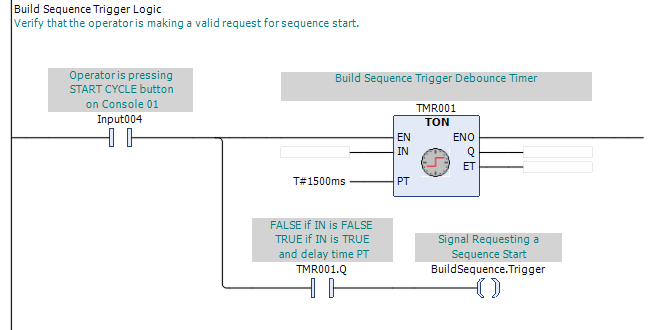
In Figure 1, the operator presses and holds the "START CYCLE" button. The request must remain TRUE long enough for TMR001.Q to become TRUE. BuildSequence.Trigger then becomes TRUE while the operator continues to make the request.
The timed qualification shown in Figure 1 is specific to this operator-request example. Other Trigger sources may require different qualification, or none at all, depending on the request being represented.
A handshake from another sequence may be used to establish the Trigger. For example, a Build sequence may call a Transfer Out sequence when its Normal Done is established. The Build sequence's Normal Done then serves as the handshake requesting the Transfer Out sequence, and may be used to establish the Transfer Out sequence's Trigger.
More than one condition may establish the same Trigger. For example, a Transfer Out sequence may normally be requested by a handshake from the Build sequence while also allowing an HMI control to provide an alternate request. Either condition may establish the Transfer Out sequence's Trigger.
A machine or process condition may also establish the Trigger. For example, detecting a package at a conveyor transfer point may request the sequence that transfers that package onto another conveyor. When additional information is required, multiple conditions may be combined to determine whether that Trigger should be issued.
The Trigger is not latched. It reflects the request logic that is present at that moment and may therefore be either momentary or steady-state. An operator pushbutton may produce a brief Trigger, while a sensor condition or sequence handshake may keep the Trigger TRUE for as long as that condition remains present.
Separate the Trigger Request from Authorization
The Trigger represents the request for sequence progression, but it does not determine whether that request may be acted upon. Authorization is determined separately by the conditions required to establish OK to Advance.

In Figure 2, the Trigger is only one condition in the authorization logic. OK to Continue, OK to Start, and NoConflict must also be TRUE, while OK to Advance is FALSE. When those conditions are satisfied, OK to Advance is established and, on an initial start, Sequence Active is established with it.
A Trigger may therefore remain TRUE for an extended period without causing the sequence to advance. The request remains present, but sequence progression does not occur until the authorization conditions are satisfied concurrently with that request.
Keeping the request separate from authorization allows the Trigger logic to describe only what is requesting sequence progression. Permissives, required starting conditions, and conflicts remain in the sequence logic specifically intended to evaluate those conditions.
Repeat the Trigger Process After an Interruption
All of the considerations in this section apply to workstations that require renewed operator intent before an interrupted sequence may resume.
An interruption occurs when OK to Continue becomes FALSE while the sequence is Active. The loss of OK to Continue resets OK to Advance. The sequence remains Active, but it is no longer authorized to advance. This is the essence of the renewal protocol.
Before sequence progression may resume, the Trigger process is repeated. A renewed request must be present while OK to Continue, OK to Start, and NoConflict satisfy the conditions required to reestablish OK to Advance.
A renewed Trigger does not necessarily use the same conditions as the original Trigger. Parallel paths may be used to establish the Trigger at different points in the sequence, with each renewal path requiring a deliberate operator request together with whatever sequence-state conditions identify that point in the sequence. The initial request, a first renewed request, and later renewed requests may therefore be paired with different conditions.
Restoring OK to Continue therefore does not, by itself, resume sequence progression. The renewed Trigger provides the operator intent required before the Active sequence is again authorized to advance.
PLC Pro Design Rules
- Define the Trigger as a single Boolean request to start or resume sequence progression.
- Often, multiple sources may set the Trigger TRUE.
- Do not latch the Trigger.
- Understand that the Trigger is a request and, by itself, will not start or resume sequence progression.
- Always use the standard sequence start conditions to establish OK to Advance.
- Require a new operator-sourced Trigger after an interruption when renewed operator intent is required.
- Use parallel Trigger paths when different renewal points require different conditions.
Diagnostics
When a sequence does not start or resume as expected, operators and maintenance staff should first ask: “Are we getting a Trigger?”
If the Trigger is FALSE, no request is currently being presented to the sequence. Check the operator control, sequence handshake, machine or process condition, or other logic intended to establish the Trigger. Where parallel paths are used, follow the path that should be producing the request under the current conditions.
If the Trigger is TRUE but the sequence does not start or resume, the request is present. Check OK to Continue, OK to Start, NoConflict, and the state of OK to Advance to determine why that request is not being acted upon.
On a workstation using the renewal protocol, an Active sequence that remains stopped after an interruption should also be checked for the renewed operator request. Verify that the operator action reaches the parallel Trigger path appropriate to the current sequence state and that the conditions required to reestablish OK to Advance are satisfied.