Purpose
In PLC Pro Sequencing, Sequence Taking Too Long answers one basic question: “Is this sequence taking longer than expected?”
The sequence timer follows Sequence Active, providing a simple measure of how long the sequence remains active from start until reset.
When the timer exceeds its expected duration, the Too Long bit provides a warning that the active sequence may require attention. Paired with the current Sequence Step, it gives operators and maintenance personnel a practical place to begin troubleshooting.
The same timer also provides useful sequence cycle-time information. That elapsed-time value can be used elsewhere in the program for monitoring, comparison, or other sequence-performance purposes.
Base the Timer on Sequence Active
To measure sequence duration consistently, PLC Pro Sequencing bases the Too Long timer on Sequence Active.
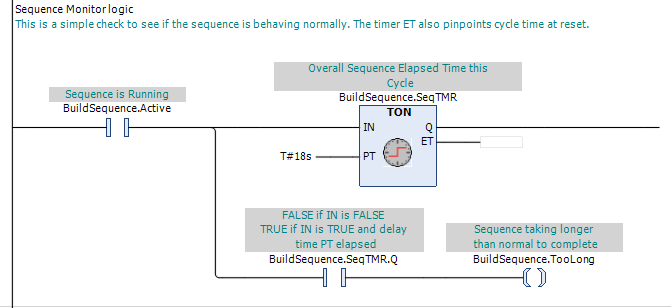
The Too Long timer is driven directly by Sequence Active. When Sequence Active becomes TRUE, the timer begins timing and continues until Sequence Reset clears Sequence Active.
A cycle interruption does not stop the timer merely because sequence progression stops. Loss of OK to Continue or OK to Advance may interrupt sequence progression, but as long as Sequence Active remains TRUE, the timer continues to accumulate.
This distinction is intentional. The timer is measuring how long the sequence has actually remained active, not just how long conditions have permitted it to advance.
The Too Long timer is part of the PLC Pro Sequencing method, but it does not limit the PLC Pro to this one measure of sequence time. Additional timers may be used wherever another measure is useful. For example, a timer could measure only the time during which OK to Advance is TRUE, or a critical Sequence Step could be timed separately when its expected duration is important.
Identify a Sequence Taking Too Long
When the sequence timer reaches its preset, Too Long becomes TRUE. This indicates that the sequence has remained active longer than its expected duration and may require attention.
Too Long does not identify a specific failure. A sequence may exceed its expected duration because of a missing sensor indication, stalled motion, communication problem, required operator action that has not occurred, mechanical problem, or another condition that interrupts normal sequence progression.
Too Long identifies that the active sequence has exceeded its expected duration. The current Sequence Step identifies where the sequence is when this occurs. Used together, they give operators and maintenance personnel a practical place to begin troubleshooting.
Too Long identifies the condition; it does not, by itself, determine what the control system should do about it. The PLC Pro decides how the condition should be used based on the machine, the process, and the intended response.
The Too Long preset should allow for normal variation in sequence duration without being reached during a normal cycle. At the same time, it should be short enough to identify an abnormal duration before unnecessary downtime accumulates.
Depending on the application, Too Long may be used only as a warning, as a qualifier for allowing a sequence reset, or as a condition that causes the sequence to reset. The appropriate use depends on what an excessive sequence duration means for that particular machine or process.
For example, a pipe-transfer sequence may raise a kick paddle and then wait for product to be detected on a roll-down table. If no product arrives and the sequence remains stuck waiting for the transfer, Too Long may be used to reset the sequence and return the kick paddle to its normal position.
In another application, an operator may initiate an E-Stop while an automatic part-transfer sequence is in progress. The cycle interruption may cause Too Long to become TRUE, even though the sequence itself remains valid. After the safety condition is reset and automatic operation is restored, the sequence can resume from its existing state. In that case, Too Long may be useful as a warning or diagnostic condition, but would not be an appropriate reason to reset the sequence.
Use the Timer for Sequence Cycle Time
The Too Long timer also provides a ready measure of sequence cycle time. Its elapsed value represents the actual time the sequence has remained active, including any cycle interruptions that occurred before the sequence completed.
When a sequence completes normally, the elapsed timer value can be captured as part of Sequence Reset before Sequence Active is cleared. This preserves the completed cycle-time value before the timer is reset.
Normal Done can be used to distinguish a normally completed sequence from one being reset for another reason. This allows completed-cycle times to be included in normal cycle-time statistics while aborted or otherwise incomplete sequences are excluded.
The captured cycle-time value can be used elsewhere in the program for production monitoring, comparison between cycles, performance trending, or other purposes useful to the application.
PLC Pro Design Rules
- The Too Long timer runs whenever Sequence Active is TRUE.
- The Too Long timer continues to run through cycle interruptions while Sequence Active remains TRUE.
- Set the Too Long preset longer than it takes to complete normal sequences.
- Keep the Too Long preset short enough to identify abnormal sequence duration promptly.
- Too Long becomes TRUE when the Too Long timer reaches its preset.
- Decide whether the sequence should ignore or respond to Too Long state changes.
- Capture the Too Long timer value in the same scan, before clearing Sequence Active.
- Use Normal Done to exclude aborted sequences from normal cycle-time reporting.
- Use additional timers when other sequence timing is useful.
- Pair Too Long with the current Sequence Step in diagnostics.
Diagnostics
Too Long should provide useful diagnostic information, not just another raw bit. By itself, it only indicates that the sequence has exceeded its expected duration. Presented together with the current Sequence Step, it can point to exactly what the sequence is waiting for.
An HMI screen can combine the current Sequence Step description with a visible indication that the sequence is taking too long. That indication may be a message, banner, color change, alarm line, or another presentation appropriate to the application.
Done properly, these diagnostics allow operators and maintenance personnel to identify the sequence interruption at the machine, without retrieving a programming laptop just to determine why the sequence is not progressing.