Purpose
In PLC Pro Sequencing, Sequence Active answers one basic question: “Is this sequence running?”
When Sequence Active is TRUE, the sequence has started and has not yet been reset. This provides operators, maintenance personnel, and other program logic with a stable indication of the sequence state.
In PLC Pro Sequencing, Sequence Active is established using the same standard logic for every sequence. This consistent structure makes sequence activation immediately recognizable throughout the control program.
Sequence Active remains TRUE until Sequence Reset. An interruption does not clear the Sequence Active state.
Other sequences may use this sequence's Sequence Active state in their NoConflict evaluations when the sequences can conflict.
Use Sequence Active as a State Reference
Sequence Active provides a stable indication of whether a PLC Pro Sequence is running or not. When Sequence Active is TRUE, the sequence has started and has not yet been reset.
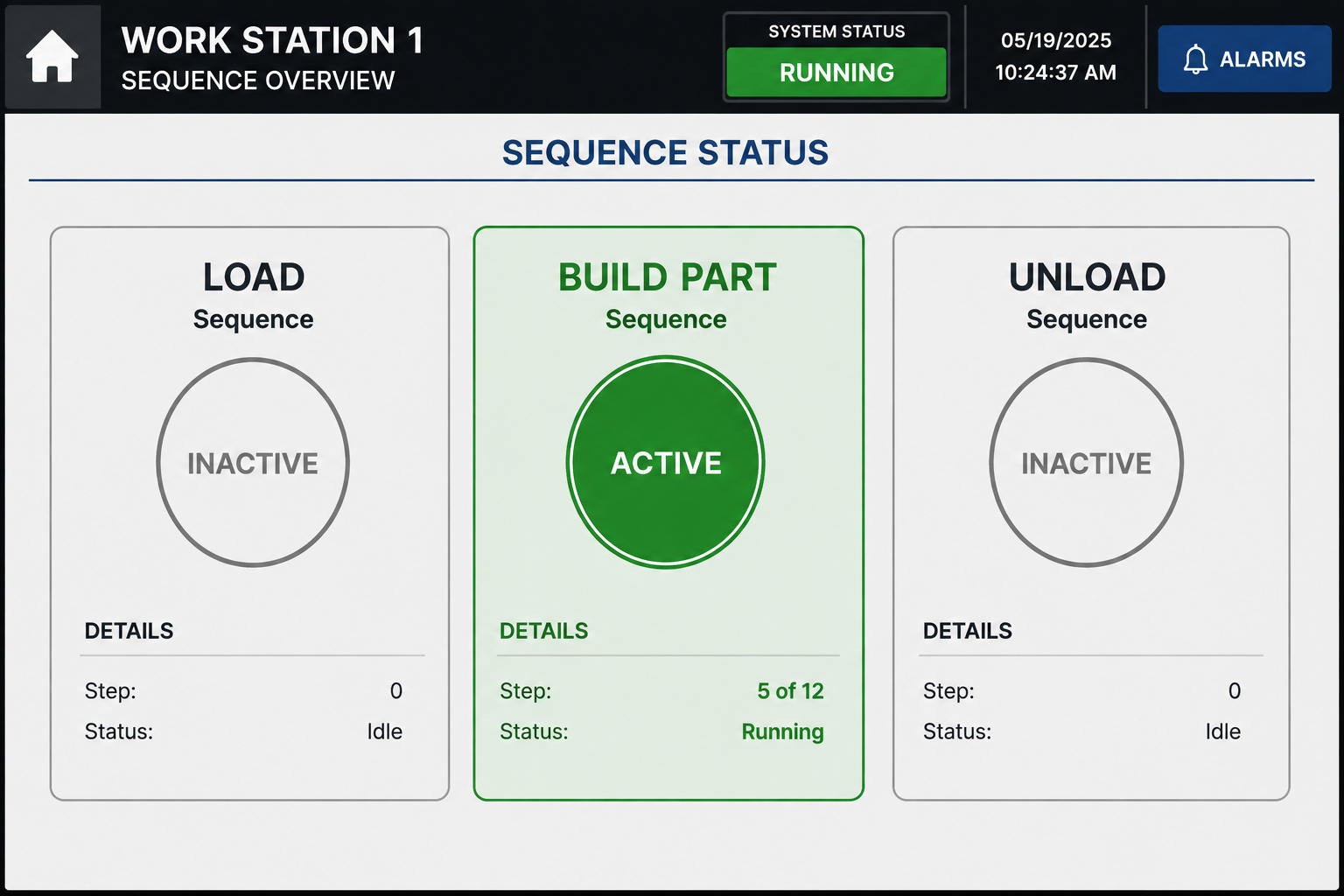
In Figure 1, the Build Part sequence is Active, while the Load and Unload sequences are inactive. This gives operators and maintenance personnel an immediate indication of which sequences are running at all times.
Because Sequence Active remains established through an interruption, an Active indication does not necessarily mean that sequence progression or machine motion is occurring at that instant. It means that the sequence would advance if it could. It may be on hold from an interruption, or simply waiting on a commanded step completion. The point is that it is active.
Establish Sequence Active Consistently
In PLC Pro Sequencing, Sequence Active is established using the same standard logic for every sequence. This consistent structure makes the activation logic immediately recognizable throughout the control program.

In Figure 2, OK to Continue, OK to Start, NoConflict, and the Trigger must all be TRUE, while OK to Advance must be FALSE. When those conditions are satisfied, Sequence Active and OK to Advance are latched TRUE.
On an initial sequence start, both Sequence Active and OK to Advance are FALSE. When the activation conditions shown in Figure 2 are satisfied, the rung latches both TRUE, recording that the sequence is running and authorizing sequence progression.
If the sequence is already Active but renewed operator intent has caused OK to Advance to be reset, the same activation logic can establish OK to Advance again. Sequence Active is already TRUE, so setting it again does not change the sequence state.
Using the same Sequence Active structure for every sequence also establishes a common language for operators and maintenance personnel. They learn what Active means, how it relates to sequence operation, and how to use that indication when understanding or troubleshooting any PLC Pro Sequence.
Retain Sequence Active Until Sequence Reset
Sequence Active is intentionally persistent. Once established, it remains TRUE until Sequence Reset.
An interruption may prevent normal sequence progression without ending the sequence. In that case, Sequence Active remains TRUE while the established Sequence Step state is preserved so the sequence can resume from that point.
When the sequence completes normally, Normal Done causes Sequence Reset to be asserted. Sequence Reset may also be asserted for another deliberately defined reason when the sequence should be abandoned rather than resumed.
In every case, Sequence Active is cleared by Sequence Reset, not directly by the condition that interrupted sequence progression or caused the sequence to be abandoned.
Use Sequence Active in NoConflict Evaluations
The Sequence Active state of one sequence may be used by another sequence when evaluating NoConflict. This allows the state of the other sequence to be considered when determining whether the new sequence may begin.
In some applications, the conflict exists for the entire time that the other sequence is Active. In that case, the other sequence's Sequence Active state may be sufficient by itself to identify the conflict.
In other applications, Sequence Active by itself does not fully identify when a conflict exists. It can be evaluated together with equipment state, Sequence Step information, or other appropriate conditions to determine when another sequence may proceed.
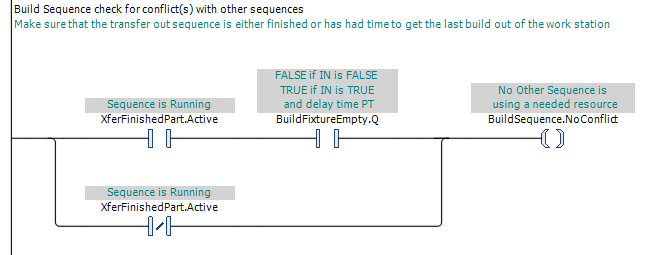
In Figure 3, if XferFinishedPart.Active is FALSE, the transfer sequence presents no conflict and BuildSequence.NoConflict can be established through the lower path. If the transfer sequence is still Active, the upper path requires BuildFixtureEmpty.Q to be TRUE, confirming that the previous build has cleared the fixture before the build sequence is permitted to proceed.
PLC Pro Design Rules
- Provide operators and maintenance personnel with a visible indication of each sequence's Active state.
- Use the same standard Sequence Active activation logic for every PLC Pro Sequence.
- Use the standard activation logic to set Sequence Active and OK to Advance together.
- Write Sequence Active as latched logic.
- Do not clear Sequence Active when an interruption temporarily prevents sequence progression.
- Clear Sequence Active only through Sequence Reset.
- Use another sequence's Sequence Active state in NoConflict logic when it is relevant to the conflict.
Diagnostics
When a workstation is not behaving as expected, Sequence Active provides an immediate answer to the practical troubleshooting question: “What sequences are running?”
The Active indications allow operators and maintenance personnel to identify which sequences have started and have not yet been reset. An Active sequence may be progressing normally, waiting for a commanded step to complete, or temporarily held by an interruption.
In repetitive automated work, operators learn the normal flow of the machine. If the main HMI or control panel shows each sequence’s Active state, the changing pattern of those indicators becomes part of that flow. A sequence that stays Active too long, or an expected sequence that does not become Active, can draw attention even before a formal alarm is generated.
If an expected sequence is not Active, check its standard activation logic. Verify OK to Continue, OK to Start, NoConflict, the Trigger, and OK to Advance to determine which condition is preventing the sequence from becoming Active.
Once the Active sequences are identified, their current Sequence Step and other sequence conditions provide the next level of information needed to determine why progression is occurring or why it has stopped.