Purpose
In PLC Pro Sequencing, Reset Conditions answer one basic question: “Should this sequence be reset now?”
In the PLC Pro method, Normal Done provides the normal path to Sequence Reset. When a sequence finishes normally, Sequence Reset is asserted immediately so the later reset logic can return the sequence to its idle state.
Abnormal reset conditions require application-specific judgment. The PLC Pro must decide which conditions should cause Sequence Reset. No one set of conditions works for every sequence.
Reset Conditions do not clear the sequence state. They assert Sequence Reset; the later Sequence Reset section performs the actions required to return the sequence to idle.
Determine When Sequence Reset Is Asserted
Reset Conditions evaluate the conditions that can assert Sequence Reset. These conditions are evaluated separately from the logic that later clears the sequence state.
Asserting Sequence Reset is different from stopping sequence progression. An interruption may leave the established sequence state intact so operation can resume from that point. Sequence Reset is asserted when that established state should instead be abandoned and the sequence returned to idle.
Reset Conditions bring the normal completion path and any deliberately defined abnormal reset paths together in a single rung. Whether the sequence finishes normally or another condition requires it to be abandoned, the decision to assert Sequence Reset is made here.
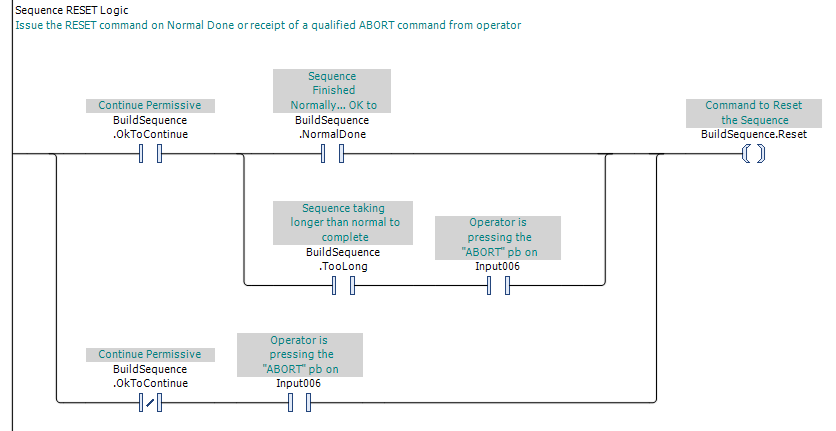
In Figure 1, three parallel paths can assert BuildSequence.Reset. The upper path represents normal sequence completion. The remaining paths provide deliberately qualified abnormal reset conditions. Each path reaches the same result: assertion of Sequence Reset.
Use Normal Done for Normal Completion
Normal Done provides the normal path to Sequence Reset. It establishes that the sequence reached its intended completion through normal sequence progression.
Because Normal Done identifies normal completion, it distinguishes a sequence that finished as designed from one that is being reset for some other reason.
When Normal Done is established, Sequence Reset follows immediately on the next rung during the same PLC scan. No additional operator request or sequence step is required.
Define Alternate Reset Conditions Deliberately
Alternate reset conditions depend on what the sequence is controlling, what equipment or process state may already have been established, and whether that state should be preserved for recovery. A condition that stops sequence progression does not, by itself, mean that the established sequence state should be abandoned.
For example, consider a conveyor unload sequence that extends a cylinder, waits for the workpiece to be detected entering the next work site, then retracts the cylinder and completes normally. If the sequence is interrupted by E-Stop Mode while the cylinder is extended, there may be no reason to preserve that established sequence state. Resetting the sequence can prevent the cylinder-extension request from being reestablished when normal operation resumes.
The PLC Pro must deliberately decide which conditions should cause Sequence Reset. Depending on the sequence, those conditions may include entry into E-Stop Mode, loss of OK to Continue, an operator ABORT request, or another condition unique to the process.
The PLC Pro always gives the operator a way to request Sequence Reset for maintenance and troubleshooting. Typically, this is a "ABORT" button in hardware or on an HMI screen. The request may be qualified before it is accepted.
In Figure 1, the ABORT request is qualified differently depending on OK to Continue. While OK to Continue is TRUE, the request is accepted only after the sequence Too Long condition has been established. If OK to Continue is FALSE, the ABORT request is accepted immediately. Development of the Too Long condition is covered on the Sequence Taking Too Long page.
Normal Done and a qualified operator ABORT request are part of the PLC Pro Sequencing structure, but they may not be the only reset conditions. A sequence may have many additional reset paths based on the nature of each type of possible interruption, operator intent, the current Sequence Step, or other sequence-specific conditions. The PLC Pro must consider each sequence individually and define the reset conditions appropriate to it.
Whenever practical, alternate Reset Conditions should be tested on the actual machine. This confirms that each reset path leaves the equipment and process in the expected state and that recovery proceeds as intended.
Separate the Reset Decision from the Reset Actions
Reset Conditions determine whether Sequence Reset should be asserted. They do not clear Sequence Active, OK to Advance, Sequence Step(s), or other sequence state.
Once Sequence Reset is asserted, the decision has been made. The Sequence Reset section below in the ladder performs the actions required to return the sequence to idle, including clearing the retained sequence state and performing any required reset-specific actions.
Keeping the reset decision separate from the reset actions makes both easier to understand and troubleshoot. The Reset Conditions rung shows why the sequence is being reset; the Sequence Reset section shows what happens when it is.
PLC Pro Design Rules
- Reset Conditions assert Sequence Reset; they do not perform the reset actions.
- Combine all reset paths in a single Reset Conditions rung.
- Normal Done provides the normal path to Sequence Reset.
- Each Reset Condition must be carefully considered and, whenever possible, tested in situ.
- A condition that stops sequence progression does not automatically require Sequence Reset.
- Provide an operator request for Sequence Reset for every sequence.
- The operator Sequence Reset request may be qualified before it is accepted.
Diagnostics
Reset Conditions should make it possible to determine why the sequence was reset. The diagnostic question is: “Why did this sequence reset?”
If the sequence completed normally, the reason for the reset is straightforward: Normal Done established the normal reset path.
After an abnormal reset, the Reset Conditions logic may no longer show which path caused it. Unless that information is deliberately recorded before the sequence is cleared, the reset itself leaves little diagnostic history. In most cases, the condition that led to the reset is already evident from the machine, alarms, or other diagnostic information.
A sequence that has stopped progressing but has not reset is not necessarily malfunctioning. An interruption may intentionally preserve the established Sequence Step(s) so the condition can be corrected and the sequence resumed without losing the work already completed.
If an operator request for Sequence Reset is not accepted, check the conditions used to qualify that request. The reset control may be working correctly even though the current sequence or machine condition prevents the request from being accepted.