Purpose
In PLC Pro Sequencing, OK to Start answers one basic question: “Do we have what we need to start or restart this sequence?”
OK to Start verifies that OK to Advance is FALSE and that the equipment is in the required state for sequence progression to begin or resume.
In PLC Pro Sequencing, OK to Start is always conditioned by a timer. The required starting conditions must remain satisfied through that timed qualification before OK to Start becomes TRUE.
Conditions required only to begin or resume sequence progression belong in OK to Start. Conditions that must remain satisfied during the sequence belong in OK to Continue, while conflicts with other sequences or machine operations are handled by NoConflict.
Verify Start and Restart Conditions
OK to Start evaluates the local conditions that must exist before a PLC Pro Sequence may begin or resume progression. OK to Advance must be FALSE, indicating that sequence progression is not presently authorized.
On an initial sequence start, OK to Advance is FALSE because progression has not yet been authorized. OK to Start then verifies that the equipment is in the state required for the sequence to begin.
The same logic is used when an Active sequence requires renewed operator intent before progression may resume. When OK to Advance has been reset, OK to Start again verifies that the equipment is in an acceptable state before progression can be reauthorized.
For example, equipment may be required to be lowered before the sequence initially starts, raised beginning at Step 3, and commanded to lower again at Step 11. The equipment is not confirmed lowered until the completion of that action establishes Step 12. During the portion of the sequence where Step 3 is TRUE and Step 12 is still FALSE, the normal lowered requirement can be bypassed in OK to Start so that a valid restart does not require the equipment to be returned artificially to its initial position.
The equipment conditions included in OK to Start are determined by analyzing the particular sequence. They represent the local machine state that must already exist before sequence progression can begin or resume.
Qualify OK to Start with a Timer
In PLC Pro Sequencing, OK to Start is always conditioned by an on-delay timer (TON). The required start or restart conditions must remain continuously satisfied for multiple scans and through the timer preset before OK to Start becomes TRUE.
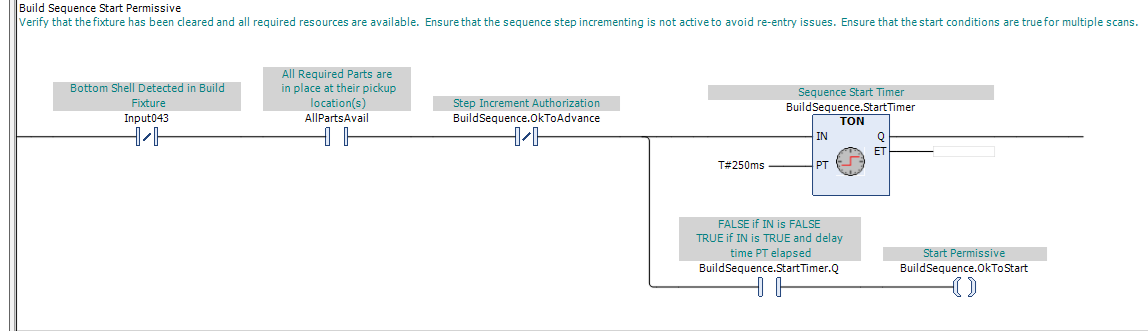
In Figure 1, the required start or restart conditions, including OK to Advance FALSE, must remain satisfied continuously while BuildSequence.StartTimer times. Only after those conditions remain valid for multiple scans through the timer preset does the timer time out and establish BuildSequence.OkToStart.
The timed qualification guards against immediate sequence re-entry by requiring the complete start or restart condition to remain valid for multiple scans before OK to Start becomes TRUE. It also prevents conditions that are satisfied only momentarily, including for a single scan, from establishing OK to Start.
The OK to Start timer preset is selected for the particular application. It should be long enough to provide meaningful qualification of the start or restart conditions without adding unnecessary delay to normal sequence operation.
Different OK to Start timer presets may also be used to give one PLC Pro Sequence preference over another when both can become ready at approximately the same time. The preferred sequence is given the shorter timer preset so that it normally establishes OK to Start first.
Giving one sequence preference through its OK to Start timer does not resolve an actual conflict between sequences. If the sequences compete for equipment, an operating area, or another shared resource, that conflict must still be handled by their NoConflict logic.
Place Conditions in the Correct Logic
OK to Start contains conditions that must be satisfied when sequence progression begins or resumes, but do not necessarily need to remain satisfied after progression is underway.
For example, a load sequence may require a fixture to be empty before the sequence begins. Once the workpiece has been loaded, the fixture is expected to become occupied. The empty-fixture condition therefore belongs in OK to Start.
A condition that must remain satisfied throughout sequence operation belongs in OK to Continue, even when it is also required at startup. Because OK to Continue is already required by the sequence activation logic, that condition does not need to be duplicated in OK to Start.
Conditions that represent conflicts with another sequence or machine operation belong in NoConflict. OK to Start should describe the local state required for this sequence to begin or resume, rather than whether another operation presently prevents it from doing so.
PLC Pro Design Rules
- Require OK to Advance to be FALSE before OK to Start can be established.
- Build OK to Start from the conditions required for sequence progression to begin or resume.
- Account for the current sequence progression point when determining the conditions required for a valid restart.
- Always qualify OK to Start with an on-delay timer (TON).
- Do not use timer preference in place of NoConflict when sequences compete for shared equipment, operating areas, or other resources.
- Place conditions required only to begin or resume progression in OK to Start.
- Place conditions that must be satisfied throughout sequence operation in OK to Continue rather than duplicating them in OK to Start.
- Handle conflicts with other sequences or machine operations in NoConflict, not OK to Start.
Diagnostics
When a PLC Pro Sequence will not start or restart, OK to Start provides an immediate indication of whether a required start or restart condition is preventing sequence progression.
If OK to Start is FALSE, HMI should identify the condition preventing it from becoming TRUE. This gives operators and maintenance personnel a direct answer to the practical troubleshooting question: “Why is it not OK to Start?”