Purpose
In PLC Pro Sequencing, OK to Continue answers one basic question: “May this sequence start or advance?”
When OK to Continue is FALSE, a sequence that has not started is prevented from starting, and an Active sequence remains frozen in its current state.
The conditions used to establish OK to Continue are determined by analyzing the particular PLC Pro Sequence and the installation in which it operates.
Govern Sequence Progression
OK to Continue is one of the conditions used to determine whether a PLC Pro Sequence may start. Before the sequence becomes Active, OK to Continue must be TRUE as the first consideration in a sequence's activation logic.

In Figure 1, BuildSequence.OkToContinue is the first permissive in the sequence activation logic. If OK to Continue is FALSE, the sequence cannot become Active, regardless of the state of the remaining start conditions.
OK to Continue must be TRUE concurrently with the other conditions required to activate the sequence. If a start request occurs while OK to Continue is FALSE, subsequently restoring OK to Continue does not satisfy that earlier request.
Once the sequence is Active, OK to Continue becomes a condition for normal sequence progression. It is placed in series in each Sequence Step rung so that no new step can be set while OK to Continue is FALSE.
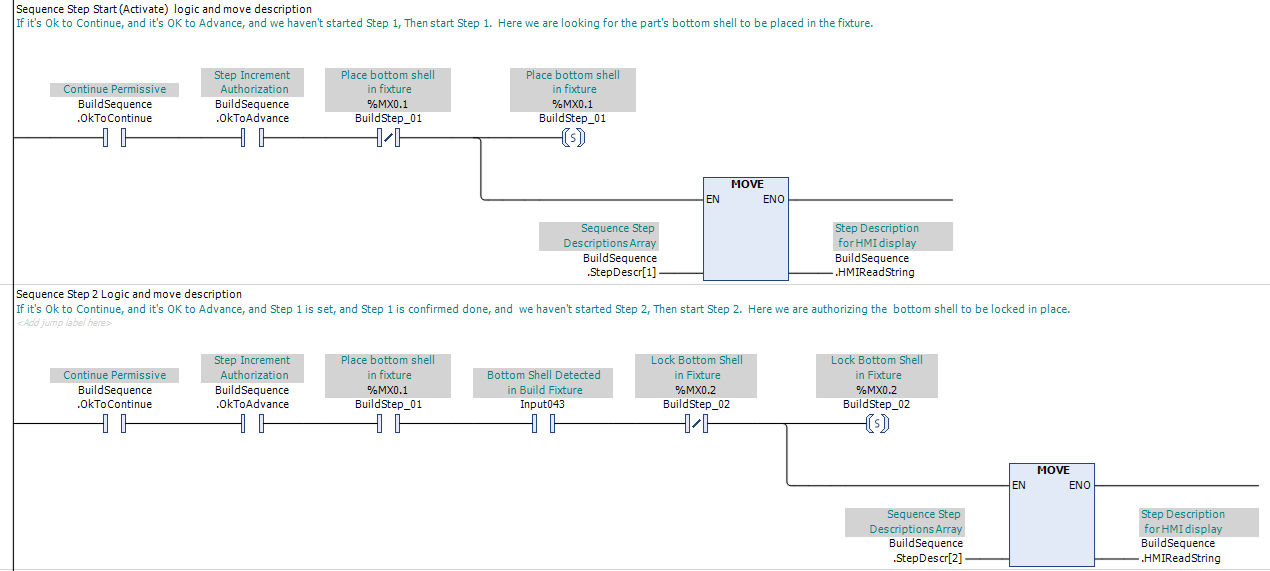
In Figure 2, BuildSequence.OkToContinue is the first permissive in each Sequence Step rung. When OK to Continue is FALSE, neither the first step nor any subsequent step can be set through the normal sequence progression logic.
In PLC Pro Sequencing, OK to Continue is always placed as the first, leftmost condition in each Sequence Step rung. Although this placement is a programming convention rather than a functional requirement, using it consistently gives maintenance personnel a predictable place to begin when troubleshooting sequence progression.
If OK to Continue becomes FALSE while the sequence is Active, the Sequence Steps already established remain TRUE. OK to Continue does not reset the sequence; it freezes the sequence at its current step.
When OK to Continue is restored to TRUE, the sequence is no longer frozen by OK to Continue. If OK to Advance remained TRUE through the interruption, normal progression may resume as the remaining conditions for the current Sequence Step are satisfied.
OK to Continue is used to enforce the determination that restarting the equipment requires renewed operator intent. When this is required, the logic tests for Active TRUE concurrently with OK to Continue FALSE. When this condition is detected, OK to Advance is immediately reset, preventing cycle resumption until renewed operator intent is supplied.

In Figure 3, when the sequence is Active, OK to Continue is FALSE, and OK to Advance is TRUE, the logic immediately resets OK to Advance. Restoring OK to Continue alone therefore cannot resume sequence progression; renewed operator intent must restore OK to Advance.
Establish OK to Continue
OK to Continue is programmed as the first rung in each PLC Pro Sequence. This is the standard PLC Pro Sequencing structure. Although scan order requires only that OK to Continue be evaluated before the sequence activation logic, it should remain the first rung for consistency and maintainability.
OK to Continue evaluates the conditions that must remain satisfied for that particular sequence to start or continue normal progression.
For virtually all PLC Pro Sequences, Auto Mode is one of the conditions required to establish OK to Continue. Additional permissive conditions are included as required by the sequence and the installation.
An Emergency Stop cancels Auto Mode. Because Auto Mode is a required OK to Continue condition, OK to Continue then becomes FALSE without requiring a separate E-Stop condition in its logic.
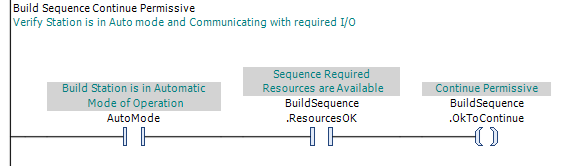
In Figure 4, AutoMode confirms that the installation is in automatic operation, while BuildSequence.ResourcesOK confirms that the resources required by the Build Sequence are available. Both conditions must be TRUE for BuildSequence.OkToContinue to be TRUE.
The conditions summarized by ResourcesOK depend on the particular sequence and installation. They may include required power, communication with distributed I/O, equipment interlocks, or other conditions that must remain satisfied for normal sequence operation.
For example, a PLC Pro Sequence that operates hydraulically actuated equipment may require the hydraulic power unit to be running as an OK to Continue condition. If the hydraulic unit is shut off, OK to Continue becomes FALSE and prevents the sequence from starting or advancing until hydraulic power is restored.
OK to Continue is not latched. Its state follows the conditions used to establish it, so the loss of any required condition immediately makes OK to Continue FALSE.
OK to Continue contains permissive logic only. Its logic evaluates the conditions required for normal sequence operation; it does not issue commands intended to establish those conditions.
PLC Pro Design Rules
- OK to Continue must be TRUE concurrently with the other conditions required to activate the sequence.
- Place OK to Continue as the first, leftmost condition in every Sequence Step rung.
- When OK to Continue is FALSE, normal sequence progression freezes.
- Loss of OK to Continue does not, by itself, reset the sequence or clear established Sequence Steps.
- Use loss of OK to Continue to reset OK to Advance when enforcing renewed operator intent.
- Program OK to Continue as the first rung in each PLC Pro Sequence.
- Build OK to Continue from the permissive conditions that must remain satisfied for the particular sequence and installation.
- Require Auto Mode as a condition of OK to Continue.
- Do not latch OK to Continue; its state must follow the conditions used to establish it.
Diagnostics
When a PLC Pro Sequence will not start or advance, OK to Continue provides an immediate indication of whether a required permissive condition is preventing normal sequence progression.
If OK to Continue is FALSE, HMI should identify the condition preventing it from becoming TRUE. This gives operators and maintenance personnel a direct answer to the practical troubleshooting question: “Why is it not OK to Continue?”