Purpose
In PLC Pro Sequencing, OK to Advance answers one basic question: “May this sequence advance to a new step?”
OK to Advance provides a common condition for progression through a PLC Pro™ Sequence. It is placed in series in each Sequence Step rung so that no new step can be set while OK to Advance is FALSE.
OK to Advance is initially established by latching it TRUE when the sequence starts, using the same OK to Continue, OK to Start, NoConflict, and Trigger conditions that authorize the sequence to start. Once latched, OK to Advance remains TRUE until a condition requiring it to be reset occurs.
OK to Advance is reset when renewed operator intent is required before an interrupted sequence may resume, and is always reset by Sequence Reset. When reset for renewed operator intent, the sequence is prevented from advancing until the required operator action is provided and OK to Advance is restored.
Govern Sequence Progression
OK to Advance is placed in series in each Sequence Step rung and governs whether the sequence may advance to a new step. When OK to Advance is FALSE, no new Sequence Step can be set.
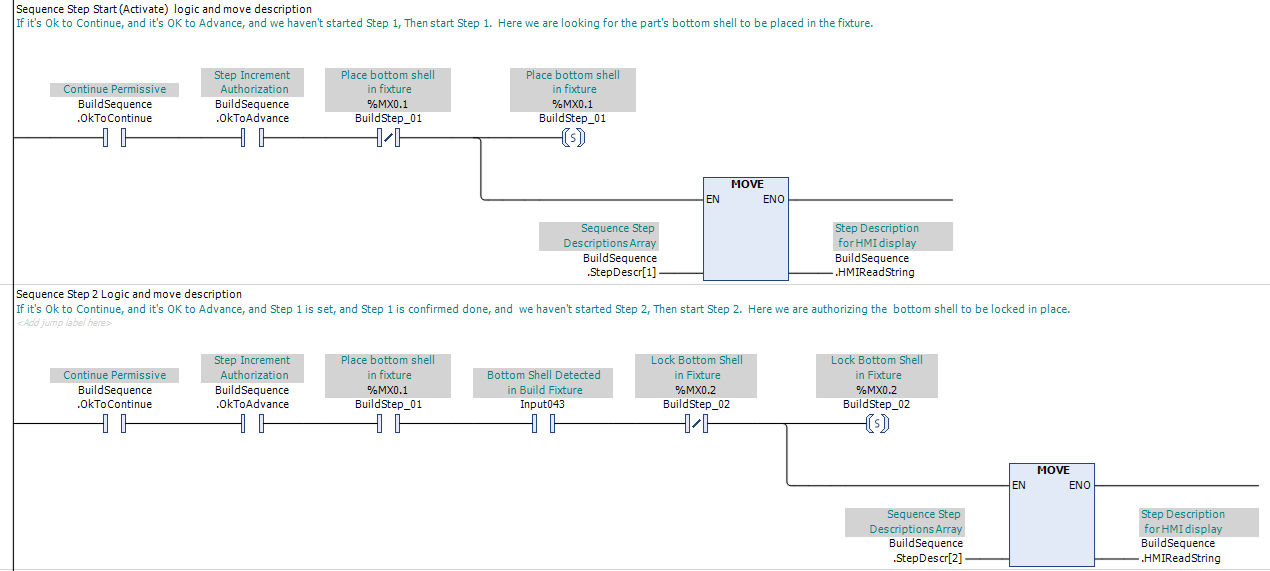
In PLC Pro Sequencing, OK to Advance is used this way in every step of every PLC Pro Sequence.
Establish OK to Advance
OK to Advance is initially established with the same conditions used to start the sequence: OK to Continue, OK to Start, NoConflict, and Trigger. When those conditions are satisfied and OK to Advance is FALSE, the logic sets OK to Advance.

Figure 2 shows the standard PLC Pro Sequencing method for establishing Sequence Active and OK to Advance. This same programming pattern is used in every PLC Pro Sequence.
On the initial sequence start, this logic establishes both Active and OK to Advance. OK to Advance is written as latched logic so that it remains TRUE after the conditions that initially set it are no longer present.
The normally closed OK to Advance condition prevents the start or restart logic from executing again while progression is already authorized.
Reset OK to Advance
An interruption that makes OK to Continue FALSE stops sequence progression because each Sequence Step also requires OK to Continue. The PLC Pro determines separately whether that interruption should also reset OK to Advance.
Where renewed operator intent is not required, OK to Advance remains TRUE through the interruption. When OK to Continue becomes TRUE again, sequence progression may continue as the remaining step conditions are satisfied.
Where renewed operator intent is required, the interruption resets OK to Advance. Restoring OK to Continue alone does not allow the sequence to progress. The required Trigger and other start or restart conditions must again be satisfied before OK to Advance is restored.

When the sequence is Active, OK to Continue becomes FALSE, and OK to Advance is TRUE, this logic resets OK to Advance. Sequence progression remains stopped until the required conditions are restored and a new Trigger restores OK to Advance.
This reset logic is placed immediately above the sequence activation logic so that loss of OK to Advance prevents all Sequence Step progression below it on the same program scan.
OK to Advance is also always reset by Sequence Reset. After Sequence Reset, a new sequence start must establish OK to Advance before sequence progression can begin again.
PLC Pro Design Rules
- OK to Advance is placed in series in each Sequence Step rung.
- OK to Advance is initially established only when all required sequence-start conditions are satisfied.
- OK to Advance must be latched by a Set/Latch instruction.
- When renewed operator intent is not required, OK to Advance remains set through the interruption.
- When renewed operator intent is required after an interruption, reset OK to Advance.
- Place interruption reset logic immediately above the sequence activation logic.
- OK to Advance is always reset by Sequence Reset.
Diagnostics
OK to Advance can be useful diagnostic information when an Active sequence is not progressing. An Active sequence with OK to Advance FALSE immediately indicates that progression authorization has been removed.
Where renewed operator intent is required, HMI diagnostics should make clear what action is required before OK to Advance can be restored. This helps distinguish a sequence waiting for renewed intent from one waiting for a permissive, interlock, process condition, or completion feedback.