Purpose
In PLC Pro Sequencing, Normal Done answers one basic question: “Did this sequence finish normally?”
Normal Done marks the successful completion of a PLC Pro Sequence. It is not a fault, abort, timeout, or operator reset. It means the sequence reached its normal final condition.
When Normal Done is established, any required handshakes are issued to other sequences or elements of the control program that depend on successful completion of the sequence.
Normal Done always and immediately triggers Sequence Reset.
Establish Normal Done
Normal Done is established only after the sequence has progressed through its final Sequence Step and the final ordered action has been confirmed complete. It therefore marks successful completion of the sequence.
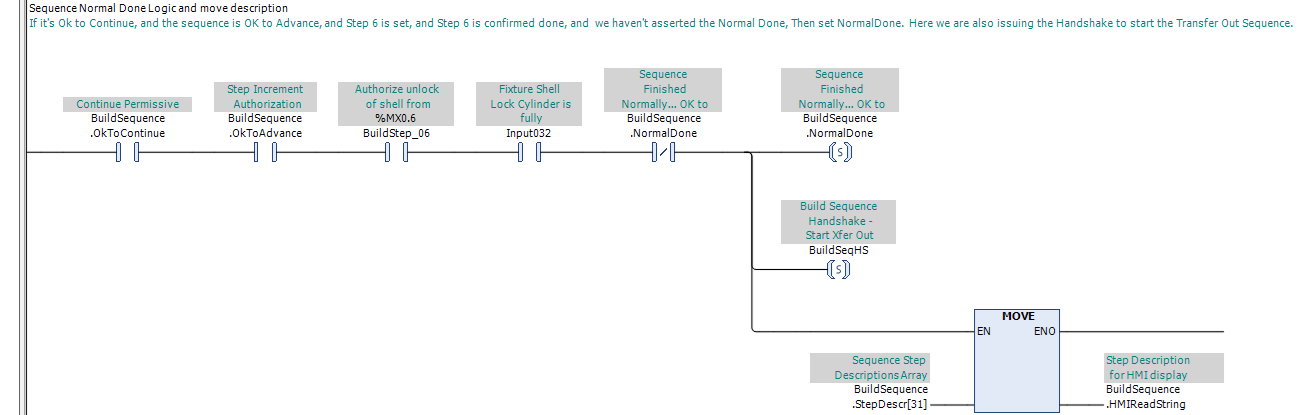
In PLC Pro Sequencing, the Normal Done rung requires OK to Continue and OK to Advance to be TRUE, the final Sequence Step to be established, the final completion condition to be satisfied, and Normal Done to not already be TRUE. When those conditions are satisfied, Normal Done is latched (set).
If the final completion condition is not satisfied, Normal Done is not set. The sequence remains at its final Sequence Step until the conditions required for normal completion are satisfied or Sequence Reset clears the sequence.
The final ordered action is confirmed complete in the same manner as any other ordered action. Confirmation may come from a sensor, timer, analog value, operator confirmation, communication response, or another selected condition that confirms the required result.
This example uses BuildSequence.StepDescr[31] for the normal-completion message. Because most sequences require fewer than 31 steps, this allows the normal-completion message to use a description-string resource that is already allocated. A separate string variable may be used instead when preferred.
Issue Required Handshakes
When Normal Done is established, any required handshakes are issued to the sequences, equipment functions, or other systems that depend on successful completion of the sequence.
A handshake issued by Normal Done typically serves as a trigger for another sequence or signals other consuming logic of the successful completion of the sequence.
Required handshakes are normally set on the same rung that establishes Normal Done. In Figure 1, BuildSequenceHS is set to trigger the Transfer Out Sequence. Because the handshake is latched, it remains available after the immediately following Sequence Reset clears the completed sequence.
In PLC Pro Sequencing, handshake bits are latched (set) and remain TRUE through Sequence Reset. Sequence Reset does not clear handshake bits.
Typically, a handshake is cleared when the receiving sequence or other consuming logic recognizes and uses it. Other deliberately defined conditions may also clear the handshake, such as an operator command, a programmed interruption response, or another condition that intentionally cancels the outstanding request.
Trigger Sequence Reset
When Normal Done is established, the sequence has completed normally and is ready to be cleared. Normal Done therefore serves as the normal trigger for Sequence Reset.

In PLC Pro Sequencing, the normal Sequence Reset path is programmed immediately after Normal Done is set. As shown in Figure 2, when OK to Continue and Normal Done are TRUE, Sequence Reset is asserted on the next rung in the same scan.
Other deliberately defined conditions may also trigger Sequence Reset, but those conditions represent abandonment of the sequence rather than normal completion.
Normal Done exists only briefly within the scan in which normal completion occurs. After it is set, Sequence Reset is asserted on the next rung, and this triggers the reset of Normal Done by the reset rungs later in the same scan. As a result, a programmer monitoring the sequence should never expect to observe Normal Done in its TRUE state.
PLC Pro Design Rules
- Normal Done must be reached only through normal sequence progression.
- Normal Done must be conditioned by OK to Continue and OK to Advance.
- Normal Done must verify that the final step is true and the final completion condition has been met.
- Normal Done must verify that it is not already TRUE before it is set.
- Normal Done must not be used for faults, aborts, maintenance resets, or other non-normal exits.
- A Normal Done rung may issue one or more required handshakes.
- Sequence Reset does not clear handshake bits.
- Normal Done must trigger Sequence Reset on the very next rung.
- Normal Done must not be used as a stable sequence state.
Diagnostics
If a sequence does not reach Normal Done, the practical diagnostic question is: “What is preventing normal completion?”
The current Sequence Step identifies where normal progression stopped, and, where a screen is available, its description identifies the condition the sequence is waiting for before Normal Done can be established.
Normal Done is an event, not a viewable sequence state. During normal operation, it should not be observed TRUE in program monitoring or appear as a status on HMI.