Purpose
In PLC Pro Sequencing, NoConflict answers one basic question: “Can this sequence start without conflicting with another machine operation?”
When NoConflict is FALSE, the PLC Pro Sequence remains inactive until the conflicting condition no longer exists.
Evaluate Potential Conflicts
NoConflict evaluates the other sequences, equipment-level functions, and machine operations that could interfere with the sequence if it were allowed to start. Two PLC Pro Sequences are considered competing when they require shared equipment, a shared operating area, or another shared resource that cannot be used concurrently.
When competing PLC Pro Sequences can control the same equipment, NoConflict prevents another sequence from starting while that equipment is in use.
For example, a conveyor section may be used to transport parts either north or south. If another PLC Pro Sequence is already using that conveyor to run south, NoConflict for a sequence that requires the conveyor to run north remains FALSE.
Competing PLC Pro Sequences do not have to control the same equipment. NoConflict is also used to prevent a sequence from starting when its equipment would enter an operating area already occupied by another sequence.
For example, a robot and a transfer mechanism may use completely different equipment but move through the same physical area. If the robot is occupying that area, NoConflict for the transfer sequence remains FALSE until the robot has moved clear.
When competing PLC Pro Sequences require a resource that can be used by only one sequence at a time, NoConflict prevents another sequence from starting until that resource is available.
For example, two PLC Pro Sequences may require the same fixture, tool, or material-handling device. If one sequence is already using that resource, NoConflict for the other sequence remains FALSE until the resource is released.
A competing PLC Pro Sequence does not have to become inactive before NoConflict can become TRUE. Once the specific condition creating the conflict has been removed, the waiting sequence may be allowed to start even though the competing sequence is still active.
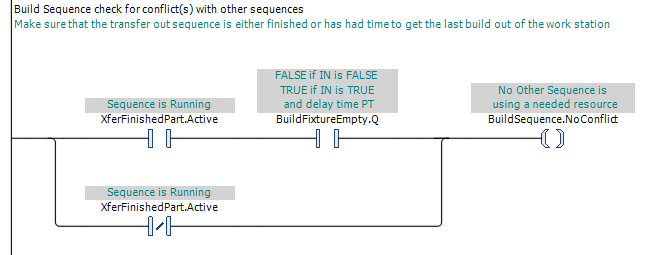
In Figure 1, BuildSequence.NoConflict is TRUE whenever the transfer-out sequence is inactive. If the transfer-out sequence is active, once the build fixture is confirmed empty the conflict is gone. The build sequence therefore waits only for the actual conflict to be removed, not for the entire competing sequence to finish.
NoConflict is used only to determine whether a PLC Pro Sequence may start. Once the sequence becomes Active, a subsequent loss of NoConflict does not stop or otherwise control the running sequence.
Other PLC Pro Sequences that could conflict with the running sequence must account for its Active state, or another condition that represents the continuing conflict, in their own NoConflict logic.
Because NoConflict can prevent a sequence from starting while the machine otherwise appears ready, its state and any condition making it FALSE should be visible through HMI. This gives operators and maintenance personnel a direct indication of what is preventing the sequence from starting.
PLC Pro Design Rules
- NoConflict must be TRUE before a PLC Pro Sequence is allowed to start.
- Account for competing uses of the shared equipment, operating areas, and other resources required by the PLC Pro Sequence.
- NoConflict should become TRUE as soon as the actual conflict has been removed.
- NoConflict is considered only when determining whether the sequence may start.
- Make the state of NoConflict and any condition making it FALSE visible through HMI.
Diagnostics
When a PLC Pro Sequence will not start, NoConflict provides a direct indication of whether a competing use of required equipment, operating area, or other resource is preventing the start.
If NoConflict is FALSE, HMI should identify the condition creating the conflict so the operator or maintenance person can see what conflict involving required equipment, operating area, or other resource is preventing the sequence from starting.