Purpose
Under PLC Pro Methods, each controlled machine element is provided with feedback sufficient to establish its meaningful Current-State. The PLC Pro develops the Current-State logic from that feedback, combining sensed conditions as needed to represent the states useful for operating and diagnosing the equipment.
HMI makes Current-State information available to the operator so that the condition recognized by the control program is readily visible during setup, recovery, adjustment, maintenance support, and troubleshooting.
Under PLC Pro Methods, when a requested action is not permitted by the control program, HMI diagnostics identify any permissive, interlock, and/or conflict preventing the action. Current-State feedback and diagnostics support setup, recovery, adjustment, maintenance support, and troubleshooting.
Establish Current-State from Feedback
The PLC Pro identifies the feedback needed to establish meaningful Current-State for each controlled machine element. Depending on the application, that feedback may come from limit switches, proximity sensors, pressure switches, auxiliary contacts, drive status, analog measurements, or other suitable sensing.
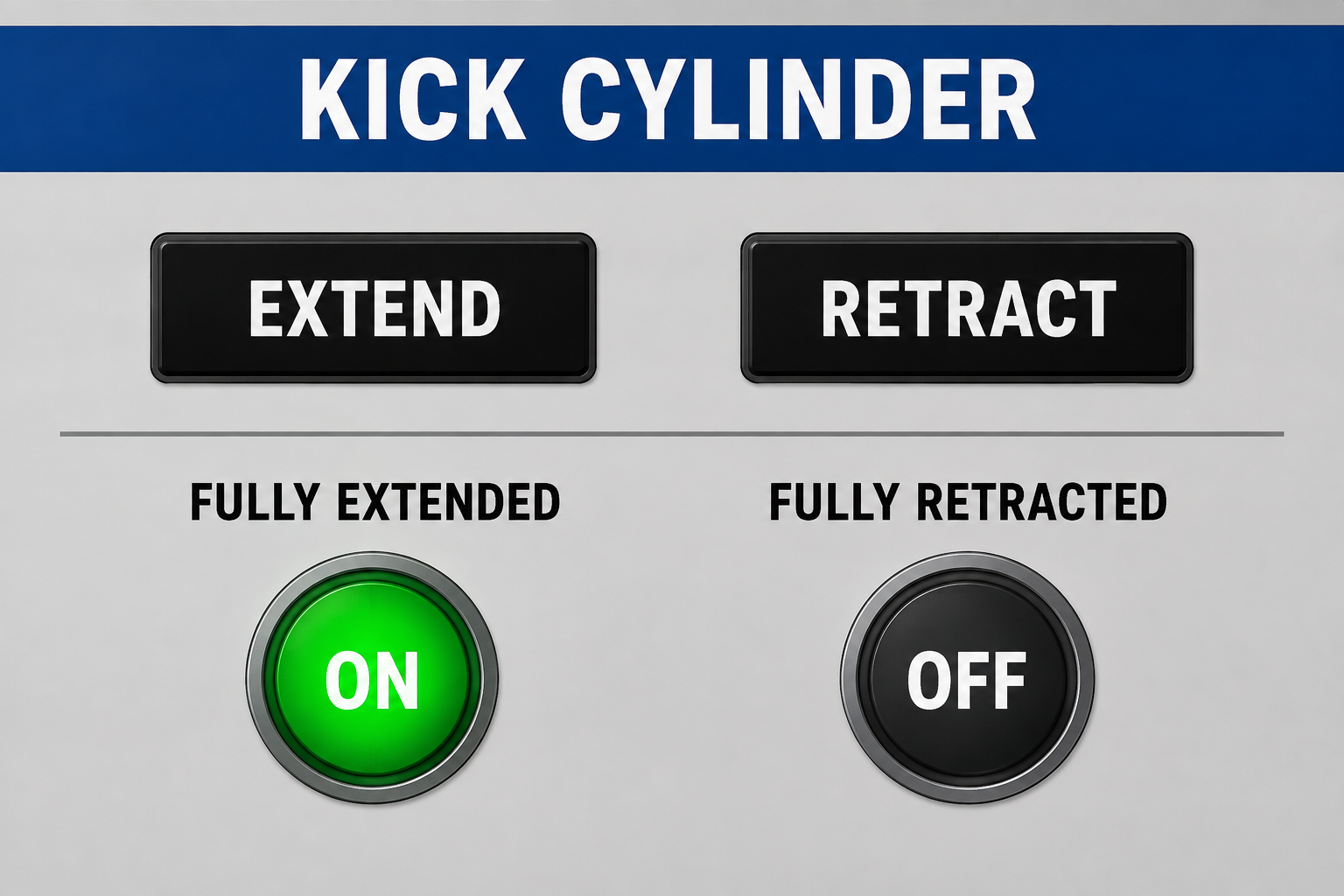
For example, a cylinder with extended and retracted limit switches may have Current-State indications labeled “FULLY EXTENDED” and “FULLY RETRACTED.” Each HMI indication simply displays the corresponding switch's ON or OFF state, regardless of commanded position.
Current-State is not limited to discrete positions or ON/OFF conditions. Depending on the equipment and application, it may include speed, pressure, temperature, level, position, load, or another measured condition useful for operating and diagnosing the installation.
For example, a hydraulic system may use a pressure transducer to provide Current-State as the actual measured system pressure. Rather than reducing that information to only a pressure-available ON/OFF condition, the control program may retain the measured pressure and HMI may display it so the operator can see the condition that actually exists.
A Current-State may be developed from a single feedback signal or from a combination of sensed conditions. The PLC Pro combines those conditions as needed to establish the meaningful states of the machine element.
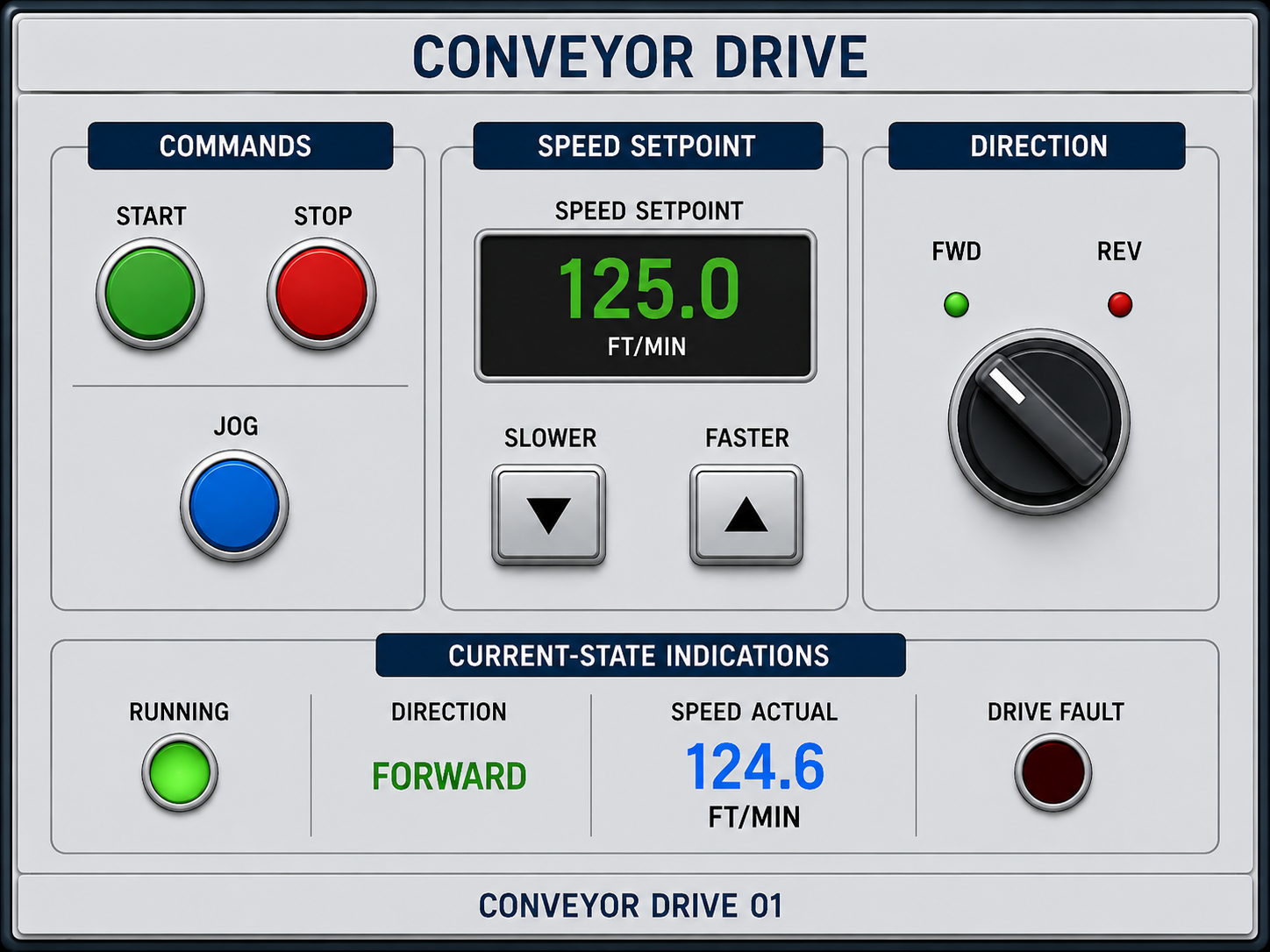
For example, a variable-speed conveyor may have Current-State information indicating whether it is ON or OFF, whether it is moving “FWD” or “REV,” and its actual speed. Together, drive status, direction feedback, and measured speed provide a more complete Current-State of the conveyor than any one feedback signal alone.
Provide Useful Current-State Indications
Controls for a machine element and the Current-State indications associated with that element should be grouped together in a clearly labeled operator-control area. Whether implemented on an HMI screen or on a physical control console, the arrangement allows the operator to issue the available commands and observe the corresponding feedback without looking elsewhere to determine the condition of the equipment.
Current-State indications should use clear, technically precise labels for the sensed condition. The label should state only what the available feedback establishes.
For example, the PLC Pro will label a cylinder end-position indication “FULLY EXTENDED” rather than simply “EXTENDED,” because the associated switch confirms the end position. When neither “FULLY EXTENDED” nor “FULLY RETRACTED” is TRUE, the operator can determine that the cylinder is somewhere between its two confirmed end positions.
Measured Current-State values such as position, pressure, temperature, speed, or level should be displayed when they provide useful information about the condition of the equipment or process.
Current-State may be used to give a single operator control more than one function. The action requested by the control is determined by the Current-State of the machine element when the control is used.
For example, a single “CYLINDER EXTEND/RETRACT” pushbutton may use Current-State to determine which action is requested. When the cylinder is fully extended, the command requests retraction; when it is fully retracted, the command requests extension.
A common HMI panel may be shared by similar machine elements. For example, the same screen may include a “CONVEYOR” selector for choosing among several installed conveyor sections. The panel's “START,” “STOP,” and “JOG” controls, direction and speed-adjustment controls, and Current-State indications then apply to the conveyor selected on that same screen.
Identify Conditions Preventing an Action
When a requested action is not permitted by the control program, the PLC Pro provides HMI diagnostics identifying any permissive, interlock, and/or conflict preventing the action. The operator should not have to determine the reason by repeatedly trying the command or by relying on maintenance personnel to investigate the control program.
A required permissive may prevent a requested action from being permitted by the control program. For example, operation of hydraulic equipment may require the hydraulic power unit to be running. A hard-wired “HYD UNIT RUNNING” indicator displays that condition, allowing the operator to readily identify the unsatisfied permissive when the indication is OFF.
An interlock may prohibit a requested action from being performed. For example, horizontal movement may be interlocked with a lift's “FULLY RAISED” status to prevent damage to the equipment. If the operator requests horizontal movement while the lift's fully raised Current-State is not established, the requested movement is prevented and HMI identifies the unsatisfied lift-position interlock.
Screen-based HMI may present a diagnostic message in a pop-up window when a condition requires the operator's attention. Depending on the application, the message may remain until the operator acknowledges it or may leave the screen after a defined time. An acknowledgement confirms that the message was seen; it does not clear the detected condition or authorize the requested action.

When screen-based HMI is provided, the PLC Pro maintains a history of recent diagnostic messages in the control program and configures HMI to give operators and maintenance personnel access to that history.
A conflict may also prevent a requested action from being permitted by the control program. For example, an assembly station may allow an operator to request placement of a part into a fixture or nest. If station sensing indicates that a part is already present at that location, the control program does not permit another part to be placed there. HMI identifies the occupied assembly position as the conflict preventing the requested action.
PLC Pro Design Rules
- Provide feedback sufficient to establish the meaningful Current-State of each controlled machine element.
- Make the meaningful Current-State of each controlled machine element available through HMI.
- Use technically precise Current-State labels that state only what the available feedback establishes.
- Group the controls for a machine element with the Current-State indications associated with that element.
- Display measured Current-State values when they provide useful information about the condition of the equipment or process.
- Provide HMI diagnostics identifying any permissive, interlock, and/or conflict preventing a requested action from being permitted by the control program.
- When screen-based HMI is provided, maintain and display a history of recent diagnostic messages.