Purpose
Safety-system reset and programmatic recovery are separate functions. The safety system determines whether its reset conditions have been satisfied and whether it can be reset. The control program monitors that safety-system status but does not determine whether or when the safety system may be reset.
The programmatic recovery process is to keep the installation in stasis after safety-system reset and hold it there until directed otherwise by the equipment operator. Recovery methods may enable machine operation, but they do not cause it. This allows for inspection, correction, repositioning, and the processing of deliberate operator requests before automatic operation is allowed to resume.
Safety-System Reset Comes First
Clearing the condition that invoked the Emergency Stop response does not necessarily reset the safety system. Releasing an Emergency Stop device, closing a guard, or restoring a required safety-system condition removes that particular demand, but the safety system must still be reset according to its validated design.
PLC Pro Methods provide HMI indications and diagnostics that identify any detected device or condition preventing safety-system reset. Those indications assist maintenance and operations personnel, but they do not replace the safety-system reset function or make the control program responsible for it.
A pneumatic press with safety-rated monitoring of a dual pneumatic valve provides an example. The safety system monitors feedback from both valve spools and requires each spool to reach its expected state within a defined time. If the feedback indicates a valve or sensor failure, the safety system stops motion and de-energizes the valve. Correcting the fault clears the condition, but the safety system remains unreset until a deliberate reset is performed. Valve-feedback diagnostics supplied to HMI can identify the condition that must be corrected before reset and recovery can proceed.
Leave E-Stop Mode Only After Reset
Using PLC Pro Methods, the control program follows the detected safety-system status. It leaves E-Stop Mode only after the safety system has been reset and the Emergency Stop response is no longer in effect.
Safety-system reset permits the control program to reset E-Stop Mode and may restore power to working devices. The control program must ensure that those devices are energized in their current state. Reset is not a request to initiate motion, resume a sequence, or return the installation to automatic operation.
Lubrication pumps, cooling systems, ventilation, and other supporting services are examples of devices that may be energized after safety-system reset without increasing the installation’s hazards. Their restoration may support or preserve the installation’s current state, but it must not initiate equipment movement or advance the operating process.
Commands, requests, and program states retained from before the Emergency Stop response must not initiate operation merely because the safety system has been reset. Each must remain inhibited until the applicable recovery conditions are satisfied and the equipment operator makes a deliberate request for operation.
The PLC Pro must identify and handle any retained program state that could create motion or another hazard when the safety system is reset. This commonly requires resetting latched commands, sequence requests, and other states that would otherwise remain TRUE and re-energize an output or command equipment to move as soon as safety-system permission is restored.
A robot cell provides an example of the distinction between energization and motion. Safety-system reset may restore power to the robot controller or permit its servos to be enabled, but it does not command the robot to move. If the robot stopped in a condition unsuitable for automatic recovery, the operator may use Manual Mode to deliberately reposition it. Automatic motion remains inhibited until the required safeguards, permissives, and recovery conditions are satisfied and the equipment operator deliberately requests Auto Mode or otherwise authorizes automatic operation.
Enter Manual Mode
After detecting that the safety system has been reset, the PLC Pro Method is to leave E-Stop Mode and place the installation in Manual Mode. Auto Mode remains cancelled.

In the PLC Pro implementation, Manual Mode is never latched. Resetting E-Stop Mode places the installation in Manual Mode because Auto Mode was cancelled when the Emergency Stop response was invoked.
Entering Manual Mode provides a defined operating condition for inspection, state reconciliation, setup, correction, and deliberate equipment movement. It allows the operator to determine the actual condition of the installation before automatic operation is requested.
Placement in Manual Mode does not itself command motion. Every actuator must still require its normal Manual Mode command, permissives, interlocks, and other operating conditions before it can move.
Reconcile Program State and Installation Condition
The installation may not be in the same physical condition that existed when the Emergency Stop response was invoked. Spring-return valves may have changed position, drives may have stopped at unplanned locations, brakes may have applied, pressure may have decayed, products may have shifted, and stored energy may have changed the position or loading of equipment.
The control program must therefore reconcile retained commands and internal program state with the actual Current-State feedback from the installation. A command or sequence state retained for diagnostic or recovery purposes must not be treated as proof that the commanded physical condition still exists.
Commands and related program states may be retained through E-Stop Mode. The PLC Pro must ensure that restoring field power or safety-system permission does not allow any retained state to cause unwanted motion or another hazardous condition. Equipment must not move until the equipment operator deliberately directs that movement.
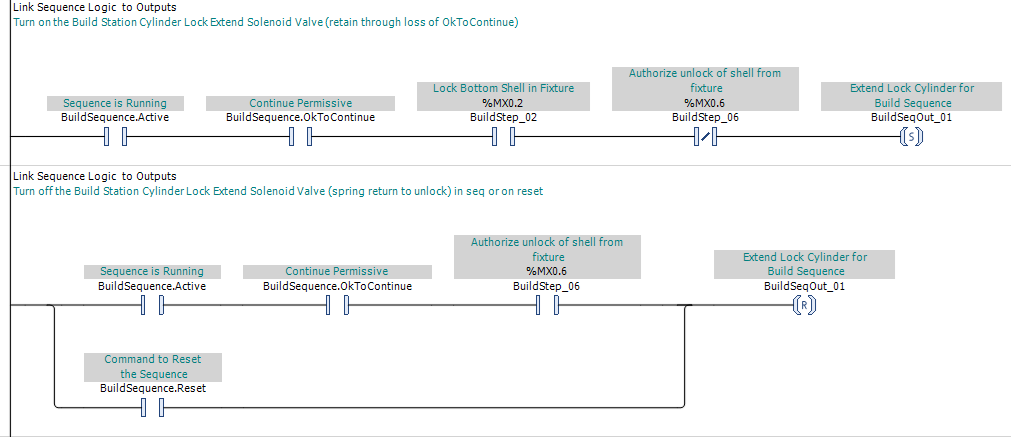
In the example above, the Build Station lock-cylinder command is intentionally retained when the sequence loses its OK-to-continue condition. The output command remains TRUE until the sequence reaches the step that authorizes the cylinder to unlock or the equipment operator resets the sequence. This defined reset path allows recovery to clear the retained command before it can cause unwanted cylinder movement.
The control program must also account for the time required for supporting services to become ready. Leaving E-Stop Mode does not mean that lubrication pressure, hydraulic pressure, communication, drive readiness, temperature, purge flow, or other required operating conditions have already been restored.
When the actual installation condition does not agree with the retained program state, the recovery process must identify the disagreement and require the appropriate correction, repositioning, or sequence reset before automatic operation can proceed.
Rearm Operator Commands
Operator commands that remained present during E-Stop Mode must not become effective immediately after safety-system reset. Maintained selector switches, HMI requests, latched pushbutton commands, and other retained inputs must be handled so the operator must deliberately request operation again.
When a maintained selector switch can command motion in Manual Mode, the control program uses an "Armed" qualifier. Entering E-Stop Mode resets the qualifier. After the safety system is reset, the switch must first be detected in its Off position before the control program rearms it. Only then can moving the switch to a commanded position initiate motion.
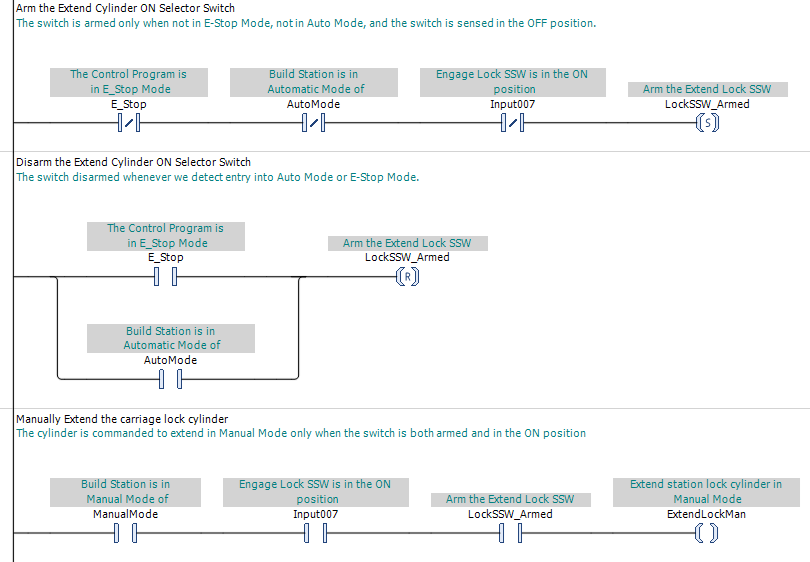
In this example, entering E-Stop Mode or Auto Mode disarms the maintained selector switch. After safety-system reset, a selector that remains in its On position cannot extend the lock cylinder. The equipment operator must first return the selector to its Off position, allowing it to become armed, and then move it back to On to deliberately command the cylinder to extend.
Momentary commands and HMI requests should likewise require release, cancellation, or a new deliberate actuation as appropriate. Safety-system reset must not be interpreted as completion of an operator command that was active before or during the Emergency Stop response.
Recover Automatic Sequences Deliberately
Entering E-Stop Mode cancels Auto Mode, but it does not prescribe a universal response for every automatic sequence. The PLC Pro determines whether each sequence retains its current status, resets immediately, or resets only when the Emergency Stop response is invoked during a defined portion of the sequence.
When a sequence retains its active status, requesting Auto Mode returns it to normal execution from the step where it stopped. The control program checks the conditions required for the next action. If those conditions are not satisfied, the sequence waits and HMI identifies what it is waiting for.
An experienced equipment operator may recognize and restore the installation conditions expected by the retained sequence step before requesting Auto Mode. The PLC Pro Method does not depend on that experience. The control program verifies that the required conditions are present before allowing the sequence to proceed.
Entry into Auto Mode must follow a deliberate operator request made after safety-system reset. Neither resetting the safety system nor completing the programmatic recovery process may automatically place the installation in Auto Mode or resume automatic cycling.
Operator Information During Recovery
After the safety system has been reset and the control program has left E-Stop Mode, HMI must clearly indicate that the installation is not in Auto Mode and identify any detected condition preventing entry into Auto Mode.
These conditions may include unavailable supporting services, unsatisfied permissives, unmade interlocks, or other requirements that must be restored before the installation can enter Auto Mode.
HMI should not combine safety-system reset and readiness for Auto Mode into one general "Ready" indication. The operator must be able to distinguish that the safety system has been reset from the conditions required for Auto Mode having been satisfied.
Implementation
Using PLC Pro Methods, when the control program detects that the safety system has been reset, it resets E-Stop Mode. Because Auto Mode was cancelled when E-Stop Mode was invoked, the installation enters Manual Mode, as shown in Figure 1. This transition does not initiate motion or automatic operation.
Individual equipment modules and sequences must not treat safety-system reset as authorization to operate. Each must still follow its normal commands, permissives, interlocks, and operating conditions.
Manual Mode is just that. Equipment does not move without a deliberate indication of operator intent through the appropriate Manual Mode command.
PLC Pro Design Rules
- Clearing the condition that invoked the Emergency Stop response does not by itself reset the safety system.
- The control program must remain in E-Stop Mode until it detects that the safety system has been reset.
- The control program does not determine whether or when the safety system may be reset.
- After safety-system reset, the control program must reset E-Stop Mode and place the installation in Manual Mode.
- Safety-system reset must not initiate machine motion, automatic cycling, or entry into Auto Mode.
- Retained commands, maintained inputs, and sequence states must not cause unwanted motion or another hazardous condition after safety-system reset.
- Supporting services and ancillary functions may be restored where doing so does not present a hazard.
- Motion and automatic operation must require deliberate operator requests made after safety-system reset.
- HMI keeps the operator apprised of recovery status and any detected condition preventing entry into Auto Mode.