Purpose
PLC Pros establish and verify the equipment-level functions and Current-State feedback required to operate each controlled machine element during the development of Manual Mode. Those proven functions and feedback provide the equipment-level foundation used by Auto Mode.
In Auto Mode, the non-safety-related program (the control program) determines when those proven equipment-level functions are required to perform the assigned work. The control program requests the applicable functions at the appropriate point in the operation.
Build Auto Mode on the Proven Manual Mode Foundation
In Manual Mode, a deliberate operator request may call an equipment-level function. The control program calls that same proven function when it is required in Auto Mode to perform the assigned work.
For example, an operator may request a fixture to clamp while operating in Manual Mode. During automatic operation, the control program calls the same clamp function when the fixture must be clamped. The source and timing of the request change, but the proven equipment-level function used to carry out the action remains the same.
An equipment-level function may be a limited sequence established during the development of Manual Mode. For example, a “HOME” function may raise a positioner before moving it to its home position. The same proven “HOME” sequence can be called by a deliberate operator request in Manual Mode or by the control program when required in Auto Mode.
Exercising the equipment-level functions in Manual Mode gives the PLC Pro hands-on experience with how the installation actually behaves. That experience reveals operating times, physical interactions, and practical dependencies that may not be apparent from drawings or specifications. Automatic operation can then be developed around observed and verified equipment behavior rather than assumptions.
The control program uses the proven Current-State feedback to determine the equipment condition that actually exists. A request to extend a cylinder does not establish that the cylinder is extended. When automatic operation requires the extended condition, the control program uses the established “FULLY EXTENDED” Current-State to confirm that condition.
Development in Manual Mode establishes the Current-State feedback available to automatic operation. Importantly, it also identifies where direct confirmation is NOT available.
For example, a PLC Pro may determine that a motor requires 3.75 seconds to accelerate to full speed even though the drive does not provide a “FULL SPEED” indication. The control program can apply that verified acceleration time before allowing a subsequent automatic operation to proceed.
Call Proven Functions Through PLC Pro Sequences
The active operating mode determines which request source may call the proven equipment-level functions. Deliberate operator requests call the applicable functions in Manual Mode. PLC Pro Sequences call those functions as required in Auto Mode.
Requests authorized only for Manual Mode are not honored while Auto Mode is active.
The operator may still participate in automatic operations as directed by the control program. The control program may direct the operator to add a part, install a fastener, or perform another required action.
When direct sensing cannot confirm that the operator completed the assigned action, the control program may require an operator confirmation before automatic operation proceeds. That confirmation may come from an operator-based action, such as pressing a “CONFIRM” button, or from a signal generated by paired finger sensors positioned outside the work area to establish that the operator has withdrawn before operation continues.
The applicable permissives, interlocks, conflict checks, supporting functions, and physical-output logic remain part of the proven equipment-level control. They apply when the function is requested from Manual Mode and when the same function is requested from Auto Mode.
Current-State feedback also remains meaningful in both modes. Although requests authorized only for Manual Mode are not honored in Auto Mode, HMI can continue to show the equipment conditions established from feedback while automatic operation directs the equipment.
When screen-based HMI is available, the screen ordinarily presented during Auto Mode monitors automatic operations and PLC Pro Sequences rather than individual equipment-level functions. Equipment-level Current-State would then remain available through other HMI screens for troubleshooting and more detailed observation.
Example Common Output Rung
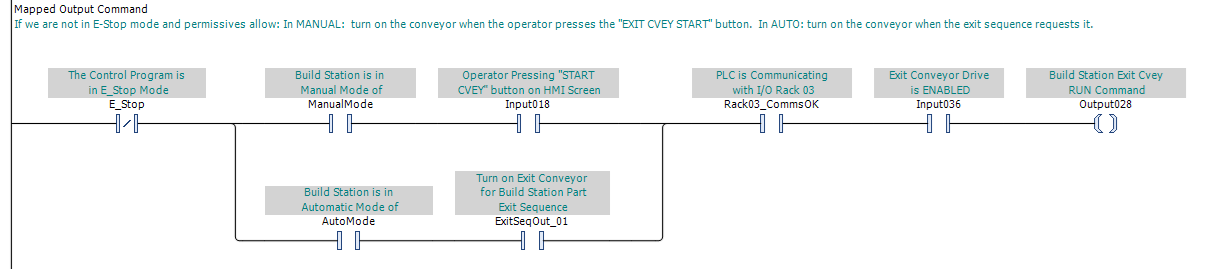
In Manual Mode, the operator calls the exit-conveyor output by pressing the “EXIT CVEY START” button. In Auto Mode, the Exit Sequence calls the same output when the conveyor is required for automatic operation.
The mode-qualified request branches join before the common permissives. Communication with the remote I/O rack and an enabled conveyor drive are therefore required before the exit-conveyor output can be called from either operating mode.
PLC Pro Design Rules
- Base Auto Mode on equipment-level functions proven in Manual Mode.
- Apply mode-authorized requests to the proven equipment-level output commands.
- Do not honor requests authorized only for Manual Mode while Auto Mode is active.
- Direct operator participation in automatic operations through the control program.
- Place permissives that apply in both Manual Mode and Auto Mode in the common output call.
- Use Current-State feedback established in Manual Mode to confirm equipment conditions in Auto Mode.
- Use verified operating characteristics when direct confirmation is not available.